AI effect · photo to video
Is it cake?Slice any photo with AI.
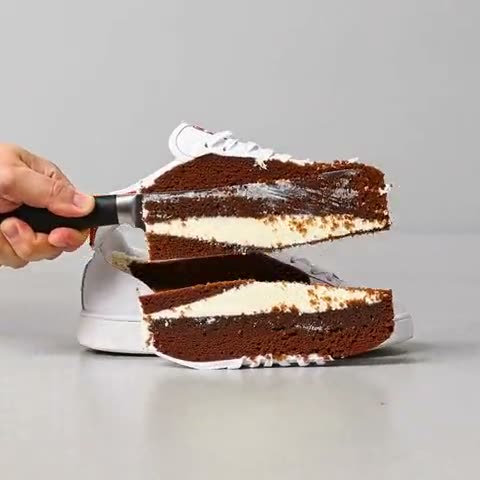
Upload a photo of an everyday object and a hand with a knife slices right through it, revealing that it was cake all along, with chocolate sponge and cream layers inside. It's the "is it cake?" trend, made from one photo.
- Price
- 47 credits
- Video
- 5 seconds
- You need
- 1 photo
How it works
One photo. A 5-second video.
This is a one-step effect: a video model animates your photo directly, bringing in a hand and a knife and cutting the object to show the cake inside.
- 01
Upload one photo
Pick a clear photo. Use your own, or one of someone who has agreed to it.
- 02
Make it with It's Cake
The price, 47 credits, is shown before you start. If the effect fails, the credits go back.
- 03
Download your 5-second video
It's usually ready in a few minutes, and waits in your effects history in AI Studio.
Best results
Pick the right photo, get a better clip.
- Use one object on a table or plain surface: a shoe, a bag, a phone, a mug.
- Shoot it from a slight angle so the cut is easy to see.
- Objects work much better than people for this one.
47 credits is about $0.94 at the $3-for-150-credits pack price, less on a plan.
More effects
Try another on the same photo.

Questions
Before you upload, in short answers.
Is the AI cake effect free?
It costs 47 credits, about $0.94 at the $3-for-150-credits pack price and less on a plan. If an effect fails, the credits go back. Pack credits never expire, and you can also earn credits from quests and daily streaks.
What photos work best?
A single object on a plain surface, like a shoe, a bag or a mug. The knife cuts through the main object in the photo.
How long is the video?
5 seconds, from your photo to the slice. You can download it when it's ready.
Is my photo used to train AI?
No. AITube doesn't train AI on your uploads. Your photo goes to the models that make your clip, and you can download the result.
It's Cake, from your own photo.
Upload a photo, see the price, and get your 5-second video in a few minutes.