Introduction
Businesses need a steady flow of video content to reach customers, explain products, build trust, and stay visible across digital platforms. However, producing fresh videos for every campaign can require significant time, creative resources, and coordination.
AI video generation is creating new opportunities for businesses to make their content production more flexible. Instead of starting every project from scratch, marketing teams can use artificial intelligence to develop visual concepts, produce creative variations, and adapt existing ideas for different audiences.
The real opportunity is not simply generating more videos. It is building a content workflow that connects video creation with business goals.
In this guide, we explore how businesses can use AI video generation to support marketing campaigns, repurpose existing content, automate repetitive tasks, improve creative testing, and measure results. We also explain the practical challenges companies should consider before adopting AI-powered video workflows.
1. Why AI Video Generation Matters for Businesses
Video helps businesses demonstrate products, explain complex ideas, and communicate their value in a more engaging format. AI video generation can make parts of this process faster by assisting with visual production and creative experimentation.
For example, a software company launching a new feature might need a product announcement, a short social media video, an educational explainer, and an advertisement.
Rather than developing every creative concept independently, the marketing team can start with one core message and adapt it into several formats.
AI video generation can support this process by helping teams create:
Product demonstrations and promotional visuals.
Short videos explaining product benefits.
Brand storytelling and campaign concepts.
Educational content for potential customers.
Creative variations for advertising experiments.
Supporting footage for tutorials and presentations.
However, AI does not automatically make a marketing campaign successful. The message, target audience, offer, distribution strategy, and quality of the final video remain important.
Businesses should treat AI as a production tool that supports a broader marketing strategy rather than a replacement for understanding customers.

2. Using AI Video Generation Across the Customer Journey
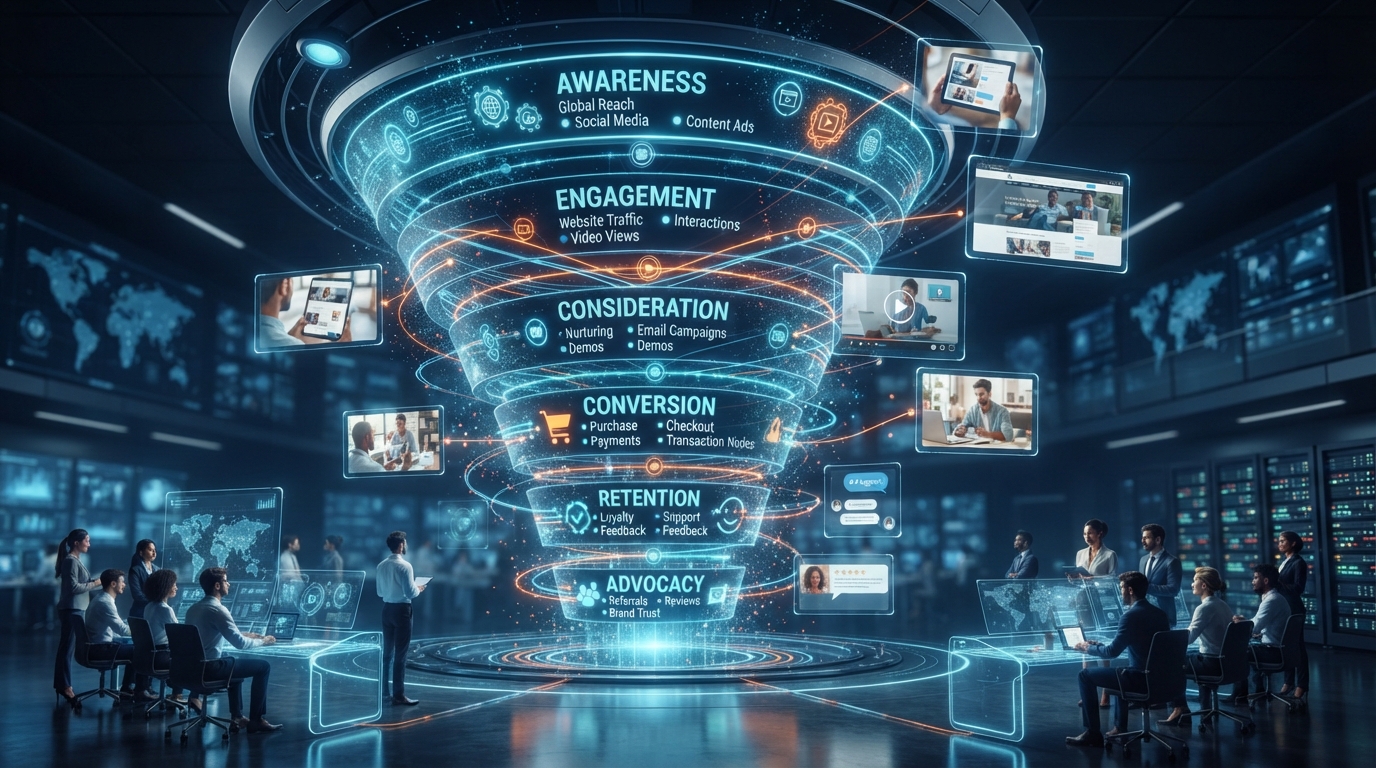
A successful marketing strategy communicates different messages depending on where customers are in their buying journey. AI video generation can help businesses create suitable content for each stage.
Awareness: Introduce your brand
At the awareness stage, people may not know your business or understand what you offer.
Short videos can introduce a problem, demonstrate an interesting idea, or show how a product fits into everyday life.
For example, an AI software company could create a short visual explaining the time-consuming task its product helps simplify.
The objective is to capture attention and communicate one clear idea without overwhelming viewers with technical details.
Consideration: Explain the value
Once potential customers understand the problem, they need more information about possible solutions.
Businesses can use videos to explain product features, demonstrate workflows, answer common questions, and compare different approaches.
For a SaaS business, a simple product walkthrough may be more useful than a purely cinematic advertisement because it shows how the product works.
Conversion: Help customers make a decision
At the conversion stage, content should address the questions that prevent customers from taking action.
This might include a demonstration, an explanation of the onboarding process, a clear offer, or a short overview of the product's benefits.
Use genuine product information and avoid generating visuals that imply capabilities your business does not actually provide.
Retention: Help existing customers succeed
Video content can also support customers after they purchase.
Businesses can create onboarding materials, feature explanations, troubleshooting guides, and educational content that helps users get more value from a product.
This approach can make video production useful beyond customer acquisition.
3. How to Repurpose One Video Into Multiple Content Formats
One of the most practical uses of AI-assisted video workflows is content repurposing.
Repurposing means transforming an existing idea or asset into multiple useful formats instead of creating every piece of content independently.
Imagine that your business has published a five-minute product demonstration. That single asset may contain enough information for several additional content pieces.
A possible workflow looks like this:
Identify the main message and the most useful moments in the original video.
Create a short script for each new content format.
Generate or select supporting visuals where needed.
Adapt the content to the intended platform and audience.
Add captions, branding, and a relevant call to action.
Review each version before publishing.
For example, one product demonstration could become a short feature highlight, a customer onboarding clip, a social media teaser, and a video answering a frequently asked question.
Not every format requires AI-generated footage. Sometimes, trimming existing footage, adding captions, or reorganizing the information is enough.
The goal is to increase the usefulness of your existing content while preserving its original message.

4. Building an AI Video Content Workflow
Using AI video generation occasionally is different from integrating it into a repeatable business process.
A structured workflow helps teams maintain quality, coordinate tasks, and avoid producing content without a clear purpose.
Step 1: Plan content around business goals
Begin with a specific objective, such as introducing a feature, increasing qualified website visits, educating existing customers, or testing a new advertising message.
Each video should have a defined audience and intended outcome.
Step 2: Create a content brief
Document the main message, target audience, video format, key visuals, required assets, and call to action.
A clear brief gives everyone involved a shared understanding of what the video needs to communicate.
Step 3: Produce the first version
Use suitable AI tools to develop visual concepts, generate supporting footage, or assist with editing.
Keep the initial version focused. Adding too many messages or visual effects can make the content less effective.
Step 4: Review and approve
Check the visuals, product details, brand consistency, narration, captions, and factual claims.
For business content, assign responsibility for final approval rather than publishing every AI-generated result automatically.
Step 5: Publish and measure
Publish the video on the appropriate channel and track the results against the original objective.
Use what you learn to improve future scripts, creative concepts, and distribution decisions.
AITube can be explored as part of a broader AI-powered creator workflow. Visit the AITube platform to learn more about its video creation and publishing environment.
5. AI Video Generation for Advertising and Creative Testing
Digital advertising often requires multiple creative concepts to discover which messages resonate with a target audience.
AI video generation can help marketers explore different visual approaches without rebuilding every concept from the beginning.
For example, a business promoting an online learning platform could test three different creative directions:
A video highlighting the problem students face.
A video demonstrating how the platform works.
A video focused on the outcome students want to achieve.
The offer and audience can remain consistent while the creative message changes.
This approach helps marketers investigate which type of communication works best.
However, avoid changing too many variables at once. If the audience, budget, offer, video, and landing page all change simultaneously, it becomes harder to understand why performance improved or declined.
Which metrics should businesses track?
The right metrics depend on the campaign objective.
Objective | Useful metrics |
Brand awareness | Reach, impressions, video views |
Video engagement | Average watch time, completion rate |
Website traffic | Link clicks, landing page sessions |
Lead generation | Leads, cost per lead, lead quality |
Sales | Purchases, conversion rate, customer acquisition cost |
A video with many views does not necessarily produce more sales. Similarly, a video with fewer views may generate more qualified leads if it reaches the right audience.
Use campaign objectives and business outcomes to evaluate success rather than relying on view counts alone.
For advertising guidance, consult Google Ads' video campaign best practices.

6. Measuring the Business Value of AI Video Production
Businesses should evaluate AI video generation based on both production efficiency and marketing performance.
Suppose a marketing team previously spent eight hours preparing a video concept and its supporting assets. With an AI-assisted workflow, the team may be able to complete some tasks more quickly.
That time saving is useful, but it does not automatically mean the campaign will perform better.
To assess the business value, track two groups of measurements.
Production efficiency
Time required to produce a usable video.
Cost per approved creative.
Number of revisions required.
Percentage of generated assets accepted for publication.
Marketing performance
Qualified website visits.
Lead or purchase conversion rate.
Cost per acquisition.
Revenue attributable to the campaign, where measurable.
Compare similar projects over time and include tool subscriptions, generation credits, editing, review, and other relevant costs.
You can also use Google Analytics campaign URL parameters to help identify traffic from specific campaigns when your analytics setup is configured correctly.
The important question is not how many videos AI can generate. It is whether the workflow helps your business produce useful content more efficiently and achieve measurable results.
7. Common Challenges When Businesses Adopt AI Video Generation
Although AI-powered production can improve flexibility, businesses should plan for several challenges.
Maintaining brand consistency
Generated visuals may not always match your brand's colors, product details, or visual identity. Use approved brand assets and review outputs before publication.
Protecting product accuracy
AI-generated scenes can introduce incorrect product features, labels, or demonstrations. Verify that all claims and visuals accurately represent the real product.
Managing content quality
Producing large quantities of low-quality content can waste resources and weaken brand communication. Prioritize useful, relevant videos over publishing volume.
Understanding licensing and privacy
Check the terms governing commercial use, uploaded assets, synthetic voices, and generated content. Avoid uploading confidential business information to tools without appropriate authorization.
Maintaining audience trust
AI-generated content should not misrepresent customer experiences, fabricate testimonials, or create misleading demonstrations.
When content contains realistic synthetic elements that fall under a platform's disclosure rules, follow those requirements. YouTube explains its approach in its altered or synthetic content disclosure guidance.
Human review remains an important part of responsible AI video production.
8. Choosing the Right AI Video Platform for Your Workflow
The best platform depends on what your business needs to accomplish.
A marketing team may prioritize quick creative production and editing. A content creator may need a publishing workflow and an audience-building environment. A developer may prioritize API access and integration options.
Before selecting a platform, consider:
The types of videos you need to produce.
Available creation and editing capabilities.
Export quality and supported formats.
Commercial usage rights.
Collaboration and publishing requirements.
Total production cost.
Integration with your existing workflow.
You can explore AITube and its platform comparison page to investigate the available creator experience and compare relevant options.
Choose based on your actual requirements rather than selecting a tool simply because it offers the largest number of features.
Conclusion
AI video generation offers businesses a practical way to rethink content production. From awareness campaigns and product demonstrations to customer education and creative testing, AI-assisted workflows can support multiple stages of marketing and communication.
The best results come from combining AI capabilities with clear objectives, strong messaging, consistent branding, human review, and reliable measurement.
Start with one business goal, create a focused video, and measure its results. Once the process works, expand it into a repeatable workflow that supports your broader content strategy.
Explore AITube to discover its AI-powered video environment and consider how it could fit into your content creation and publishing workflow.