Key takeaways
AITube video uses AI to generate complete video clips and animations, democratizing video production for all users.
Its core purpose is to automate and accelerate video creation by removing barriers like expensive equipment, complex software, and extensive post-production expertise.
AITube can create diverse content types, including explainer videos, marketing shorts, and educational modules, all from text descriptions or prompts.
The video creation process involves user inputs like scripts and prompts, AI processing to generate visuals and audio, and iterative refinement based on feedback.
AITube empowers content creators, marketers, businesses, and educators by enabling rapid, cost-effective, and personalized video production.
What is AITube Video?

AITube video represents a fundamental shift in how digital content is produced, enabling users to generate complete video clips and animations using artificial intelligence instead of traditional filming or intricate editing software. This technology leverages advanced generative AI models to democratize video production, making it accessible for individuals and businesses without extensive technical skills or large budgets. The platform interprets user inputs, transforming written concepts directly into dynamic visual stories by assembling visual, audio, and narrative components into coherent, ready-to-publish videos.
What is the Core Purpose of AITube Video?
The primary goal of AITube video is to automate and accelerate the creation of diverse video content, effectively removing common barriers to entry for creators. This innovative approach means users no longer need expensive equipment like cameras or complex software suites, nor do they require actors or extensive post-production expertise to bring their visions to life. Instead, the focus shifts to conceptualization, allowing rapid prototyping of ideas, production of multiple content versions, and scaling video output to meet demanding schedules.
What Kinds of Content Can AITube Video Create?
AITube video generates a wide array of content by transforming text descriptions into engaging visual narratives. Users provide specific instructions, often called prompts, which guide the AI in synthesizing scenes, characters, voiceovers, and music. This direct input method allows for the rapid development of various formats.
Explainer videos for product demonstrations or service descriptions.
Marketing shorts designed for social media campaigns.
Educational modules that simplify complex topics.
Animated presentations for business pitches or internal communications.
Personalized video messages for customer engagement.
Subsequent sections will explore the detailed steps involved in creation and who stands to benefit most from this innovative technology.
AITube Video Creation: From Concept to Screen
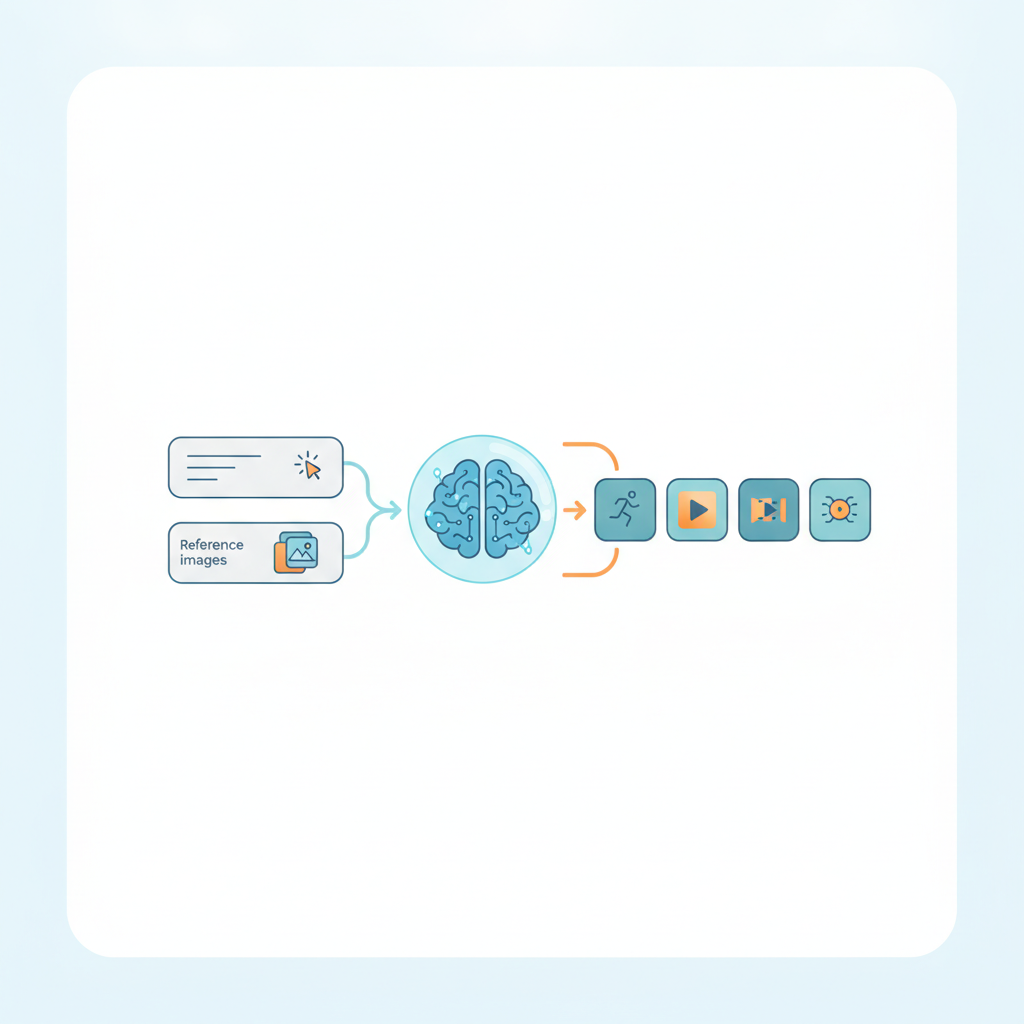
Creating an AITube video transforms a conceptual idea into a visual story through a structured, AI-driven workflow. This process typically begins with user input, moves through various AI generation and synthesis stages, and concludes with a refined video output ready for viewing.
What Inputs Drive AITube Video Creation?
The journey of an AITube video starts with your creative direction. Users provide core components such as a text script detailing the narrative, along with specific textual prompts that describe desired scenes, characters, actions, and styles. These prompts act as instructions for the AI, guiding its creative output. Sometimes, users also upload reference images, audio clips, or even existing video segments to influence the AI’s generative process, ensuring visual and auditory consistency. Effective prompt engineering is key to translating your vision accurately.
How Does AI Process and Generate Content?
Upon receiving inputs, the AI engine processes information through several stages. It first analyzes the script and prompts to understand narrative flow, character needs, and stylistic preferences. The AI then generates visual elements for each scene, including backgrounds, objects, and characters, guided by descriptive prompts. Concurrently, it synthesizes voiceovers, selects background music, and integrates sound effects to match on-screen action. Characters and elements are animated, orchestrating movements and transitions to bring scenes to life according to the script's pacing.
This process often involves an iterative loop. Users review early drafts and provide feedback; prompt adjustments or script refinements guide the AI to fine-tune visuals, voice performance, or timing. The AI then continually renders and refines video segments for a cohesive final product.
Refining and Exporting Your AITube Video
Review the initial AI-generated draft for content, pacing, and visual accuracy.
Modify prompts or script sections to address any discrepancies or improve specific elements.
Select preferred voice talents, music tracks, or sound effects from available options.
Approve the final version for high-definition rendering and export, ready for sharing.
Who Benefits from AITube Video and Why?

AITube video empowers a wide range of users to create compelling content quickly and efficiently, from marketers needing rapid campaign assets to educators developing engaging lessons. This technology democratizes video production, enabling individuals and organizations to produce high-quality visual content without extensive technical skills or large budgets.
How Do Content Creators and Marketers Benefit?
Content creators can scale their output dramatically, generating more video content in less time. Marketers leverage AITube video to launch targeted campaigns with unprecedented speed and personalization.
Rapid prototyping of ad creatives, often guided by effective prompt engineering.
Personalized video messages for specific audience segments.
Efficient production of social media content across multiple platforms.
Quick generation of explainer videos for new products or services.
What Advantages Does AITube Video Offer Businesses and Educators?
Small businesses gain a professional video presence without incurring high production costs, allowing them to compete more effectively. Educators can craft dynamic and interactive learning materials, enhancing student engagement.
Businesses utilize AITube video for creating engaging product demonstrations, internal training modules, or customer support explainers. These tools streamline operations and improve communication.
Educators produce interactive lectures, historical reenactments, or scientific simulations, making complex subjects accessible and memorable. This technology fosters a more immersive learning environment.
Ultimately, the impact of AITube video extends beyond mere convenience, opening new avenues for communication across various sectors by making advanced video production capabilities accessible to all.
Ready to Create? Your First AITube Video Steps

To begin creating with AITube video, focus on understanding the platform's core mechanics and setting clear creative intentions before generating your first output. This initial preparation streamlines your workflow and leads to more satisfying results.
What Are the Essential First Setup Steps?
Before diving into complex projects, familiarize yourself with the basic interface and available tools. A solid understanding of the platform prevents common early frustrations and accelerates your learning curve.
Create your AITube account and complete your profile, ensuring all required details are accurate.
Explore the dashboard to locate key features like the project workspace, asset library, and generation settings.
Review your initial credit allocation or subscription details to understand your usage limits and plan your first projects accordingly.
How Do I Approach My First AITube Video Project?
Your first project should serve as a learning exercise rather than a final product. Focus on simple concepts to grasp the input-output relationship and refine your prompt engineering skills.
Begin with a short, simple concept—perhaps a single scene or a brief animation—to quickly learn the generation process.
Draft specific and descriptive prompts, focusing on key visual elements, actions, and desired mood. Understanding what is prompt engineering and how does it work significantly improves results.
Generate multiple variations of a scene or clip. Comparing these outputs helps you identify which prompt elements yield the best results.
Utilize placeholder audio or simple text overlays initially. This allows you to focus on visual generation without the added complexity of full sound design.
Iterative creation is key. Don't expect perfection on your first attempt; instead, learn from each generation and refine your approach for subsequent projects.